Guide
What is a good app for someone newly diagnosed with Parkinson's?
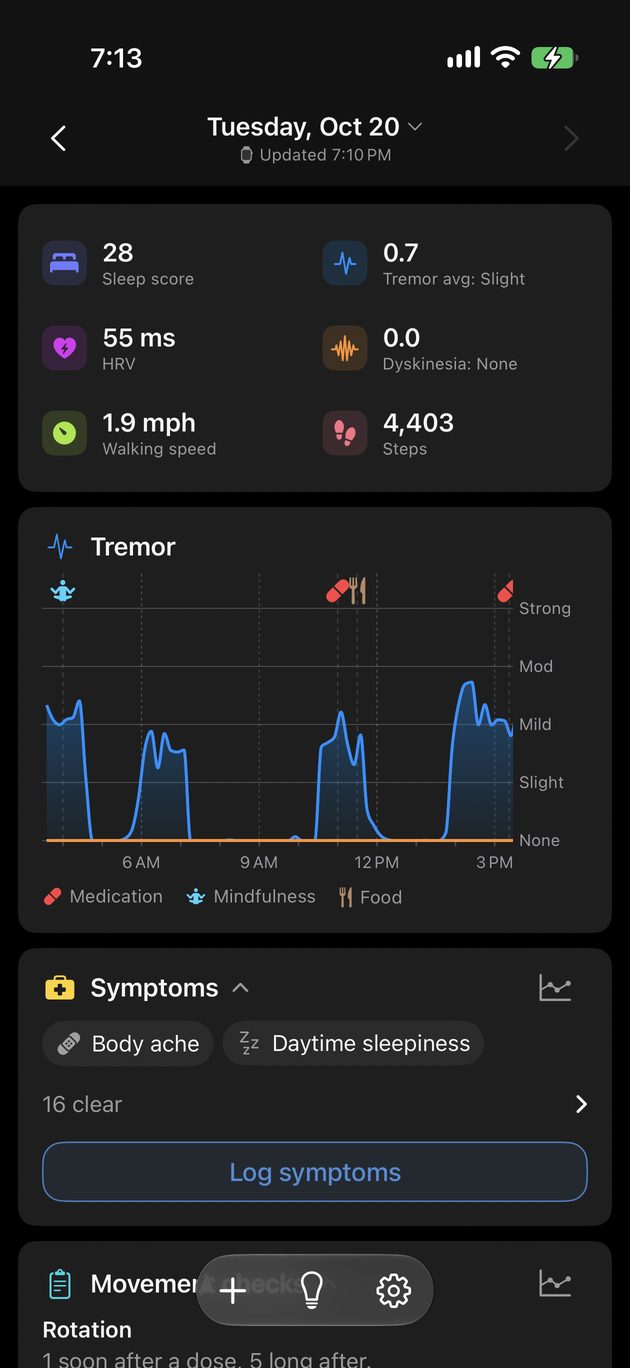
Start with something that asks little of you. Kampa needs two habits to be useful: log your doses (a tap each), and wear an Apple Watch if you have one. From that it shows how your tremor and movement change through the day and around each dose - and you can add meals, symptoms and sleep later, or never.
The first week
- Install Kampa and allow Health access. If you already log medication in Apple Health, Kampa reads it - nothing to re-enter.
- If you have an Apple Watch, install the Kampa watch app and wear it as usual.
- Log each dose with a tap, or give a medication its times and log from the reminder.
- Open the app every few days. Patterns need a few days before they appear.
What you will see first
Your day as a chart, with doses marked on it. Walking speed history from Apple Health, which often goes back years. Cards only appear once your data clears a real statistical bar, so early on there are few - that is by design.
What it is not
Kampa is not a diagnosis and not medical advice, and it never suggests a medication change. It is a record of your own days, for you and your care team.
More guides: Track tremor and dyskinesia all day with an Apple Watch · See how long each dose holds, and the gaps between doses · Keep medication, meals and movement on one timeline · Track Parkinson's with just your iPhone · See whether protein near a dose changes how it works for you · Turn weeks of tracking into a report for your appointment · Keep a record of the weeks your neurologist never sees · What an app records that a diary cannot - and the reverse · Kampa is free, with no subscription or account · Log constipation, fatigue, mood and 14 more in one tap · See whether your sleep moves your next-day tremor · See whether each kind of exercise moves your tremor and walking · Log doses with one tap, and meals and symptoms by voice · Log pump settings and see your tremor within each one · Questions to ask before you choose a tracking app
Try it on your own record
Kampa is free on the App Store, with no subscription and no account to create. Questions? info@kampa.health reaches the people who build it.
Kampa is a personal tracking tool, not a medical device. It does not diagnose, treat or give medical advice, and it never suggests a change to your medication.